Volumes and scratch space
Which PVC gets restored
Section titled “Which PVC gets restored”An app often has more than one PVC. The default example here is nextcloud with two: html
(files) and pgdata (database). A RestoreCheck lists both in restoredVolumes. A Restore
(or RestoreTest) has one source for each. sourcePVC is the key that ties them together.
| Provider | What a source restores | Restored claim | Namespace |
|---|---|---|---|
kopiur |
The PVC in one Snapshot. One Snapshot holds one PVC. |
<restore>-<sourcePVC>-<hash> |
The Restore namespace. |
volsync |
The PVC of one ReplicationSource. |
<restore>-<sourcePVC>-<hash> |
The Restore namespace. |
velero |
Its sourcePVC from the one Backup that all sources name. spec.velero can narrow the restore with label selectors. |
The source PVC name, for example html and pgdata. |
bret-scratch-<hash>. |
- A Kopiur or VolSync claim name is
<restore>-<sourcePVC>-<hash>. The hash of the pair keeps the names of twoRestoreobjects apart, for exampledbwithdata-xanddb-datawithx. When the name is longer than 63 characters, the operator shortens it. - Velero restores all PVCs of the
Restorenamespace from theBackup. The optional selectors inspec.veleromatch the labels stored in the backup.labelSelectorandorLabelSelectorsare exclusive. - One restore reads all sources. The check pod mounts every restored claim at the
mountPathof itssourcePVC.
The operator checks that the pieces fit. Each one ends the Restore as Failed: the Ready
condition is False with that reason, a Warning Event is written, and no check pod runs. A
RestoreTest retries it like any failed attempt, until retries run out:
SourceMissing: thesourcePVCset of the check and of theRestorediffer. A volume of the check has no source, or a source has no volume.SourceMismatch(Kopiur and VolSync): the backup holds another PVC than thesourcePVCof its source. For example,htmlpoints at theSnapshotofpgdata.RestoredVolumeMissing(Velero): asourcePVCof theRestorewas not restored. The selector did not match it, or the backup does not contain it.CheckRefMissing(Velero): a Secret or ConfigMap that the check needs is not in theRestorenamespace, so the operator cannot copy it into the scratch namespace.BackupUnsupported(Velero): the backup holds no volume data that a PVC restore brings back. The PVC was saved with file system backup (Velero writes that data only when it restores the pod), or theBackuphassnapshotVolumes: false. The restore would give an empty volume.BackupNotFound(VolSync): the mover found no snapshot at or beforerestoreAsOf, so the restored volume is empty.
A one-volume app has one entry on each side. It works the same way.
The scratch-volume rule
Section titled “The scratch-volume rule”The operator creates a volume for each restore attempt. The Restore owns the volume (except for Velero), because Velero creates the PVC itself in the scratch namespace.
A restore never writes into a live application volume.
The check pod mounts the scratch volume. It reads the restored data. It must not change the application’s own volume.
Scratch volume size
Section titled “Scratch volume size”The diagram shows how a Restore picks the size of its scratch volume, and which reason it sets
when it cannot.
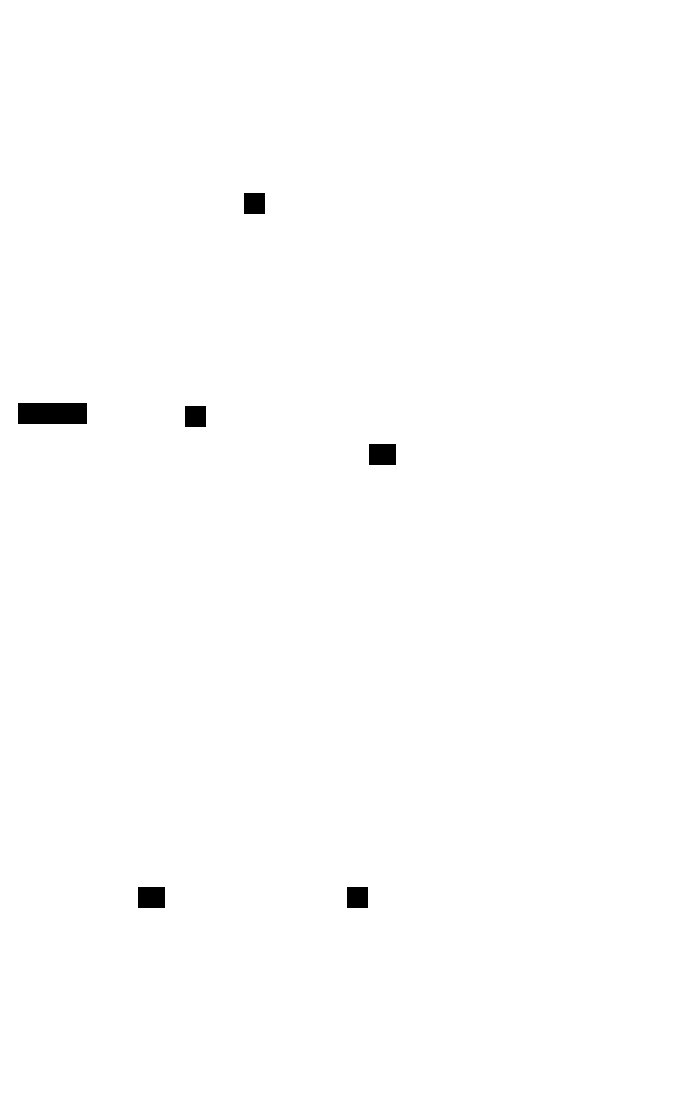
size is optional on every source (Kopiur and VolSync). The size is resolved for each source. With
an unknown source size, a set size is used without the capacity check.
Two more failures are reported as reasons on the Restore. Both end it as Failed, and nothing is
created:
SizeUnknown: the source size is unknown andsizeis not set. It is also set for a runningRestorefrom an older operator version that has nostatus.resolvedSize.InsufficientCapacity:size, or theautoExpandresult, is smaller than the source size.
The source size comes from the provider:
- Kopiur: the data size of the
Snapshot. - Velero: the PVC request in the backup.
- VolSync: the request of the source PVC.
autoExpand has these fields:
percentage: headroom on top of the source. Above 0, at most 1000.minandmax: optional bounds.minmust not exceedmax.
Example: a 20Gi source with the default gives 22Gi. For a fixed size, set size. Or use
percentage: 100, min: X, max: X with X at least the source size.